


Easy Fax - Send Fax from Phone
4.38.63K Reviews
App Specs
- Version
- 2.4.9
- Updated On
- License
- Free
- Downloads
- 1,000,000+
- Developer
- Cool Mobile Solution
- Categories
- Business
- Platform
- Android
Screenshots
 Analysis by AppCompare
For a task that still insists on fax, using a phone can spare you a trip to an office or a hunt for a working machine. I find Easy Fax - Send Fax from Phone most appealing when the document is already digital or when I can photograph a paper copy and send it promptly. It is a business app from Cool Mobile Solution, and its central promise is practical: get a document from your phone to a fax recipient without making faxing an everyday project.
Who benefits from having fax in a pocket
This is a useful option for people who fax occasionally rather than maintain a dedicated machine: freelancers sending a signed form, a small business owner handling a supplier document, or someone dealing with an organization that still accepts paperwork by fax. It is less compelling if nearly all your contacts accept email attachments or online forms. In those situations, a PDF sent by email is usually easier to file, search, and share, and it avoids paying for a fax transmission.
A realistic use case is receiving a form during a busy day, filling it out on paper, and needing to return it before heading home. With a phone-based workflow, you can capture the pages, check that the text is legible, enter the recipient’s fax number, and send without finding a printer or fax machine. The convenience is real, but I would still slow down for important paperwork: verify the number, inspect every page, and keep a copy of the document you sent.
Choosing the right route for each document
Compared with a traditional fax machine, a phone app takes up less space and is easier to use away from a desk. Compared with email, it serves the narrower need of reaching a recipient who specifically requires fax. That distinction matters: I would not treat fax as a better general-purpose way to send files. It is a practical bridge for a stubborn workflow, not a replacement for ordinary digital document sharing.
For a one-off fax, an app can be more convenient than buying or locating hardware. For regular high-volume business use, though, I would compare the cost and workflow with a dedicated office service before making it the default. Repeatedly sending long documents from a phone can become tedious, and a shared business process may need clearer records and control than an individual mobile workflow provides.
Getting Started with Easy Fax
First things first, setting up Easy Fax is a breeze. Available for both Android and iOS, downloading it was as simple as pie. Once it was on my phone, I was greeted by a clean and intuitive interface that made navigation feel like a walk in the park. No complex menus or confusing instructions—just straightforward options that got me ready to send my first fax in no time.
Readability and navigation in a short task flow
The main advantage of a focused fax app is that it keeps the task recognizable: choose or capture a document, prepare it, and send it. That matters when I am doing something unfamiliar and want to avoid searching through unrelated tools. The original experience here feels approachable, though a simple interface does not remove the need to check details carefully. A misread fax number or an incomplete page can matter more than a few extra taps.
Worth Reading Before You Choose

EA SPORTS FC Mobile 26 Is a Bigger Football Game, but It Takes Time

Flipboard Shows What News Apps Must Do Beyond the Feed

Switching to Android Auto Means Rethinking Your Driving Routine

Google Calendar Makes a Crowded Week Easier to Manage

Ludo King Makes the Most of the Minutes Between Plans

Baby Panda World Brings Quick Play to Modern Phones, but Its Game Library Feels Busy
If you are new to mobile faxing, I recommend preparing the document before opening the sending flow. Put pages in order, check that photographs are in focus, and make sure the recipient’s number is written down correctly. This reduces back-and-forth between apps and makes it easier to review the fax as a whole instead of rushing through each screen.
Features That Stand Out
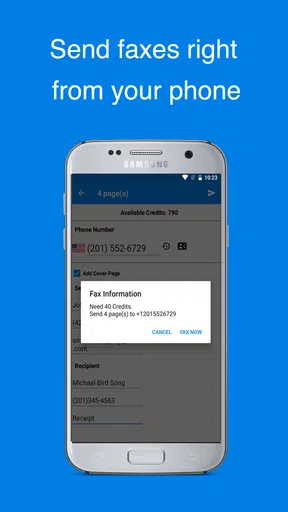
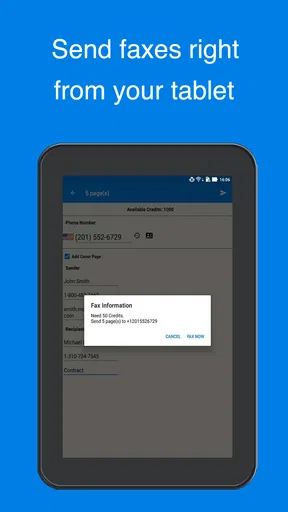
One of the standout features of Easy Fax is its ability to send faxes directly from your phone. With a few taps, you can send documents to any fax number worldwide. It supports various file formats, which is super convenient. You can upload documents directly from your phone or access them via cloud storage services like Google Drive and Dropbox. This flexibility is something I genuinely appreciated.
That choice of sources helps with a small but common problem: the document you need may not be stored where you expect. If it is already in a cloud account, selecting it there can save the hassle of downloading a duplicate first. For a cleaner workflow, I would use a clearly named final copy rather than a draft with a similar filename, then preview the selected file before sending. That is especially useful for contracts or forms where a blank or outdated page could cause confusion.
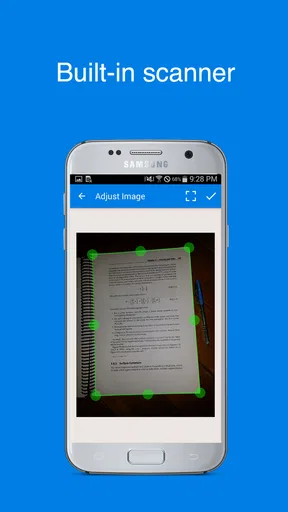
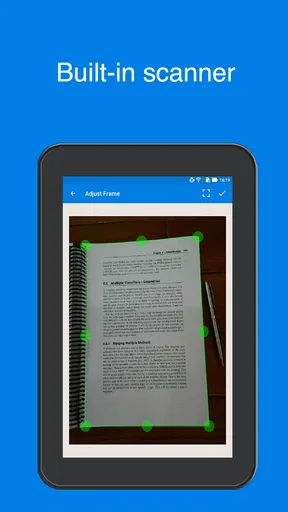
Another noteworthy feature is the ability to scan documents using your phone’s camera. The app uses advanced image processing to enhance scanned images, ensuring that the recipient gets a clear and legible fax. I tried scanning a few pages, and the results were surprisingly good. The edges were cropped perfectly, and the text was sharp and clear.
Camera scanning is handy when a paper document is the only copy available, but it is not magic: lighting, shadows, folds, and handwriting can all affect what comes through. I would place pages on a contrasting, flat surface and check the preview for clipped corners or faint text. For a multi-page packet, review the page order as well; a readable scan can still be a poor submission if the pages arrive mixed up.
Motor and sensory considerations
A phone-based process can be easier than operating a bulky machine, especially when the fax is occasional and the user already handles documents on a smartphone. It also avoids the need to stand beside office equipment. At the same time, faxing on a small screen asks for careful tapping, reading, and visual inspection. Someone who finds small text or precise touch controls difficult may prefer preparing the document on a larger screen or asking a trusted person to double-check the number and pages.
For users with low vision, glare or a dim camera image can make document checks harder even when the app’s scanning result looks clear at first glance. I would zoom in on the final preview where possible and compare it with the original paper before sending. If a page contains fine print, a faint signature, or important handwritten details, a flatbed scanner or a larger-screen workflow may offer more confidence than a quick phone capture.
Keeping It Secure
Let’s talk about security because, honestly, who doesn’t worry about their documents floating around in cyberspace? Easy Fax takes this seriously. It offers encryption for fax transmissions, giving you peace of mind that your documents are safe and secure. I found this particularly reassuring when sending sensitive information.
Even with encrypted transmission, I treat the phone and the document itself as part of the security picture. Before sending, I check that I selected the intended file and recipient, especially if the phone contains several versions of the same form. Afterward, I avoid leaving sensitive pages open in a public setting and keep only the copies I actually need. For highly confidential material, follow the recipient’s instructions and your organization’s rules rather than assuming any mobile tool is automatically the right channel.
Situational access and practical preparation
The app is designed for moments when a fax is required but a machine is not nearby. That can be useful while traveling, between appointments, or while working from home. The phone becomes the capture and sending device, which reduces dependence on a printer-and-fax setup. It does not make every environment suitable, though: a shaky hand, poor lighting, a weak connection, or a noisy place where you cannot concentrate can make a rushed submission less reliable.
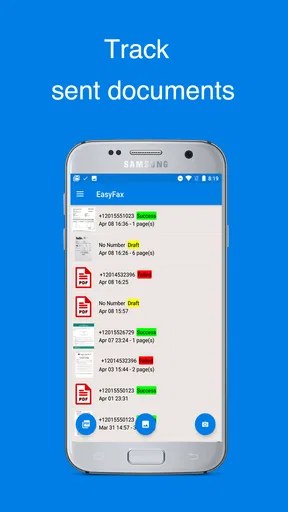
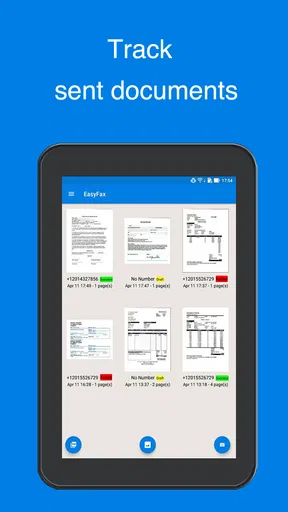
For a smoother send, I would gather every page first, make sure the document is complete, and use a quiet moment to enter the fax number. If the recipient has a deadline, send with enough time to respond to a failed transmission rather than waiting until the final minute. The ability to track sent-fax status is helpful here, but a status update is not a substitute for confirming that the recipient has what they need when the document is urgent.
The User Experience
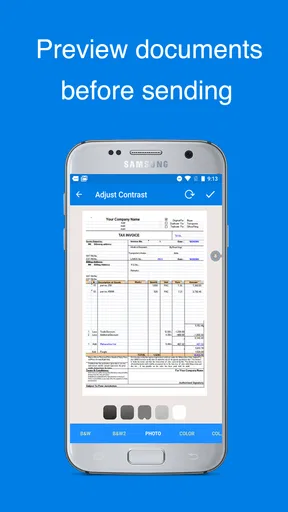
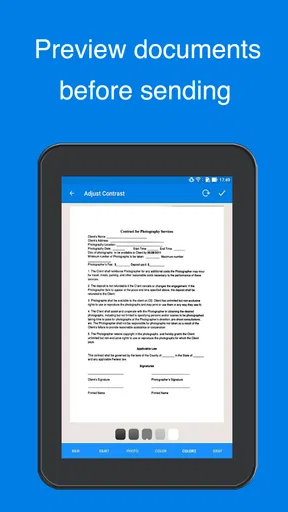
Using Easy Fax is about as straightforward as it gets. The app guides you through each step of the faxing process, so there’s no guesswork involved. Need to add a cover page? Check. Want to preview your fax before sending? No problem. It’s all seamlessly integrated into the app.
One thing I found particularly handy was the ability to track the status of sent faxes. The app provides notifications and updates, so you’re always in the loop about whether your fax was sent successfully or if there were any hiccups along the way.
That feedback is more useful than it may sound. If a send does not go through, knowing there was a problem gives you a chance to check the number or try again instead of assuming the paperwork arrived. For something time-sensitive, I would note the outcome and keep the original document handy. If the recipient needs proof or a particular delivery method, ask them what confirmation they accept rather than relying on a notification alone.
Costs and the occasional-fax trade-off
The app is free to install, but sending can involve in-app purchases, with items ranging from $2.49 to $49.99. That makes the best fit depend on how often you fax. For a rare form, paying for a send may still be worth it compared with finding a machine, but anyone faxing routinely should think about how quickly individual costs add up and compare the available options before relying on it for daily work.
It has an average rating of 4.4 from around 21,000 ratings, and it has been installed over a million times. Those figures suggest that many people have found a reason to keep a mobile fax option available, but they cannot tell me whether it suits a particular workplace or accessibility need. I would start with a simple, non-urgent document if I were testing whether its workflow and purchase structure fit my own routine.
Remaining barriers to consider
The biggest limitation is built into the task: a fax app is only useful when the receiving organization accepts fax. If a portal, email address, or secure upload is available, that alternative may be clearer and easier to archive. Another friction point is that phone scanning depends on the paper and the environment. A curved page, poor contrast, or hard-to-read handwriting can still produce a document that needs to be redone.
There is also a difference between sending a file and managing a document process. A person who needs shared access, formal approval, or a consistent office record may find a mobile fax app too individual for the job. In that case, a business document system or an office fax service is likely a better match. I would skip this app if I never fax, if I need a high-volume workflow, or if the recipient specifically requires a different submission method.
Is It Worth It?
So, is Easy Fax worth your time? In my experience, absolutely. The convenience of being able to send a fax from anywhere, without needing a physical fax machine, is invaluable. Whether you’re a professional who needs to send contracts on the go or someone who occasionally needs to fax documents, this app makes the process hassle-free.
Plus, with its user-friendly interface and robust feature set, it’s hard not to love it. The app offers in-app purchases for credits, but the pricing is reasonable, especially considering the convenience it provides.
It is free to download, rated for Everyone, and its current version is 2.4.8, with Android 7.0 as the minimum operating-system requirement. Cool Mobile Solution released it on April 13, 2017. I see those details as useful context rather than a reason on their own to choose it: the deciding questions are whether you need fax, whether the recipient accepts it, and whether the cost of your expected use feels sensible.
An inclusive verdict for a specific need
For people who already use a smartphone comfortably and only need to fax now and then, this is a convenient way to bridge a paper-based requirement. The camera workflow and ability to select documents from different sources make it more flexible than carrying paperwork to a machine. For someone who struggles with touch accuracy, small-screen reading, or camera-based scanning, it may take more effort than a larger device or help from another person.
My advice is to treat it as a practical option, not a universal answer. Prepare pages carefully, check the preview and recipient, and decide whether a paid send makes sense before committing to regular use. If those steps fit your situation, this can remove an annoying errand. If accessibility, high-volume records, or a non-fax submission channel matters more, choose the workflow that gives you clearer control.
Final Thoughts
In a world that’s rapidly moving towards digital solutions, Easy Fax - Send Fax from Phone bridges the gap for those moments when a fax is still necessary. It’s an elegant solution for a seemingly outdated problem, and it does its job exceptionally well. If you ever find yourself needing to send a fax, this app is definitely worth checking out.
Pros
- Simple user interface for easy navigation.
- Supports multiple file formats for faxing.
- Option to preview faxes before sending.
- Offers secure and encrypted transmissions.
- Compatible with both Android and iOS devices.
Cons
- Limited free credits; requires in-app purchases.
- Occasional delays in sending faxes.
- Some users report occasional app crashes.
- Requires internet connection to function.
- Lacks advanced editing features for documents.
FAQs for Easy Fax - Send Fax from Phone
How does Easy Fax - Send Fax from Phone work?
Easy Fax allows users to send faxes directly from their smartphones. After downloading the app, you can easily scan documents using your phone's camera or upload files from cloud storage. Once uploaded, simply enter the recipient's fax number and hit send. The app converts your files into fax format and transmits them securely.
Is Easy Fax compatible with all smartphones?
Easy Fax is compatible with both Android and iOS devices. It requires a minimum operating system version—usually Android 5.0 or iOS 10.0 and above. Always ensure your device is updated to the latest version for optimal performance. Check the app store for specific compatibility details related to your device.
Are there any costs associated with using Easy Fax?
While Easy Fax is free to download, it operates on a credit system for sending faxes. Users need to purchase credits via in-app purchases. The cost varies depending on the number of pages and destination. Occasionally, promotions may offer free credits or discounts, so keep an eye out for offers.
How secure is the transmission of faxes through Easy Fax?
Easy Fax prioritizes user security by using encryption protocols to protect data during transmission. The app ensures that your documents are sent securely to prevent unauthorized access. However, users are advised to avoid transmitting sensitive information unless absolutely necessary and to always keep the app updated.
Can I receive faxes using Easy Fax?
Currently, Easy Fax primarily focuses on sending faxes. Receiving faxes directly through the app is not supported at this time. Users looking to receive faxes may need to explore alternative solutions or services that provide a dedicated fax number for incoming transmissions.


